


Japanese browser games are often designed for players in Japan, which can create challenges for users connecting from the United States. Pages may load slowly, sessions may become unstable, or some platform features may behave differently depending on region, account settings, payment methods, or service policies.
One practical option is to use a Japan VPS as a remote Windows desktop environment. Instead of running the game browser directly on your U.S. PC, you connect to a Windows VPS hosted in Japan and operate the browser from there. This article explains how a Japan VPS works, how it compares with a VPN, how to set up the environment, and what account safety rules you should check before playing.
Why Japanese Browser Games Can Be Hard to Access from the USA
Region Restrictions and Japan-Based Access
Many Japanese browser games are built with a Japan-first audience in mind. That does not always mean they are impossible to access from overseas, but some platforms may limit or adjust access based on region, IP address, payment method, account settings, or local service policies.
For a player in the United States, this can lead to issues such as pages not loading correctly, games failing to start, login loops, or messages indicating that the service is not available in your area. Even when the game itself loads, related services such as account verification, payments, or event pages may behave differently outside Japan.
This is why many players look for ways to use a more Japan-based browser environment. A Japan VPS does not guarantee access to every service, and users should always follow each game’s terms of service. However, it can provide a remote Windows desktop hosted in Japan, where browser traffic is handled from a Japanese data center instead of directly from a home connection in the United States.
Common Issues with Overseas Connections
Even without strict region restrictions, distance can affect the experience. The connection path between the United States and Japan is long, and browser games may require repeated communication with servers for loading assets, updating battle results, opening menus, or syncing account data.
Common problems include:
- Slow initial loading times
- Temporary connection errors
- Session timeouts during events or long play sessions
- Unstable behavior when switching screens
- Inconsistent connection quality when using shared VPN services
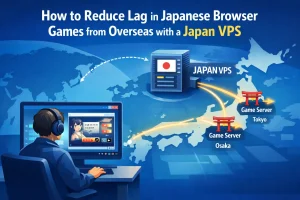
A Japan VPS does not remove the physical distance between the United States and Japan. However, it changes where the game browser runs. The browser communicates with the game server from inside Japan, while your U.S. PC only sends keyboard, mouse, and screen data through Remote Desktop.
What Is a Japan VPS and How Does It Help?
Running the Game Browser on a Server in Japan
A VPS, or Virtual Private Server, is a remote server environment that you can control over the internet. With a Japan VPS, the server is located in Japan. If the VPS runs Windows, you can use it like a remote Windows PC: install a browser, open game websites, log in, and manage your browser game environment from there.
For Japanese browser games, the key idea is simple: the game is not running directly on your U.S. computer. It is running inside a browser on a Windows VPS in Japan. This means browser access is handled from the VPS environment rather than from your local U.S. connection.
For players looking for a Japan VPS for browser games, the main benefit is not raw gaming performance but a consistent remote browser environment located in Japan. This setup can be useful for players who frequently use browser games or web services optimized for Japanese users.
Using Remote Desktop from Your U.S. PC
To control a Windows VPS, you typically use Remote Desktop Protocol, often called RDP. RDP lets you open a window on your local PC and operate the remote Windows server as if you were sitting in front of it.
In practice, the flow looks like this:
- Your U.S. PC connects to the Japan Windows VPS using Remote Desktop.
- The browser game runs on the VPS in Japan.
- Your keyboard and mouse inputs are sent to the VPS.
- The VPS sends the screen image back to your PC.
This can be a good fit for many browser games because they often do not require the same real-time responsiveness as fast-paced action or competitive games. For turn-based games, management games, card games, collectible RPGs, and event-based browser games, a remote desktop setup can be comfortable enough when configured properly.
Japan VPS vs VPN for Japanese Browser Games
When a VPN May Be Enough
A VPN is often the first tool people think of when they want to access websites from another region. It routes your local traffic through a server in another country, which can make your browser access appear to come from that location.
For some players and some games, a VPN may be enough. If the game loads smoothly, your connection stays stable, and the platform accepts the VPN IP address without issues, then a VPN can be a simple solution.
However, browser games can be sensitive to connection changes. Some VPN services use shared IP addresses that may be heavily used by many people. If the IP address changes often, becomes congested, or is flagged by a platform, you may experience login problems or unstable sessions.
When a VPS Can Be More Stable
A Japan VPS is different because the game browser runs directly on the server in Japan. Instead of tunneling your entire local PC connection through a VPN, you are operating a remote desktop environment located in Japan.
For users comparing Japan VPS vs VPN options, the key difference is whether the browser runs locally or inside a Japan-based remote desktop environment.
This can offer several practical advantages:
- A consistent Japan-based server environment
- A dedicated Windows desktop for browser games
- Less dependence on changing VPN routes
- The ability to keep your game browser, bookmarks, and settings in one place
- A cleaner separation between your local PC and your gaming environment
This does not mean a VPS is always better for every player. A VPN may be simpler for occasional use, while a VPS is better suited for players who want a stable, always-available Japanese desktop environment. The best choice depends on the game, your connection, your budget, and the level of reliability you need.
How to Set Up a Japan Windows VPS for Browser Games
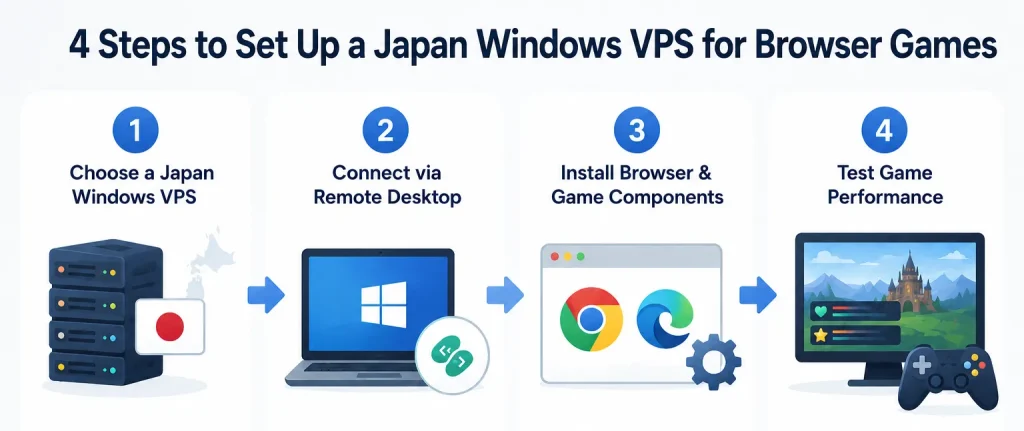
Step 1: Choose a Japan Windows VPS
The first step is to choose a VPS plan hosted in Japan. For browser games, a Windows VPS is usually the most convenient option because many players are already familiar with Windows browsers, Remote Desktop, and standard desktop workflows.
When choosing a plan, consider:
- CPU performance for smooth browser operation
- Memory capacity for running modern browsers
- Storage space for browser cache and required components
- Network stability between your location and Japan
- Whether Windows Server is included or supported
Browser games are usually lighter than full 3D PC games, but modern browsers can still use a significant amount of memory. For browser games on VPS, the goal is to create a simple, stable Windows environment rather than a high-end gaming machine.
Step 2: Connect via Remote Desktop
After your Japan Windows VPS is ready, connect to it using Remote Desktop.
- Windows users can use Remote Desktop Connection.
- macOS users can use Microsoft Remote Desktop.
- Enter the VPS IP address and login credentials.
- Adjust screen resolution and clipboard settings if needed.
Once connected, you should see the remote Windows desktop environment.
Step 3: Install Your Browser and Game Components
Inside the VPS, install your preferred browser such as Chrome or Edge.
Depending on the game platform, you may also need to:
- Enable cookies
- Allow pop-ups
- Adjust language or time zone settings
- Create a dedicated browser profile for games
Keeping browser settings and game logins inside a dedicated profile can make long-term management easier.
Step 4: Log In and Test Performance
After setup is complete, visit the game platform and test basic actions such as:
- Loading the home screen
- Opening menus and event pages
- Switching between tabs
- Checking responsiveness during gameplay
Do not evaluate performance only during the first few minutes. Browser games may behave differently during peak hours, updates, or large in-game events.
Performance Tips for Playing from the United States
Adjust Browser and Graphics Settings
If the game feels slow over Remote Desktop, start with simple browser adjustments. Close unnecessary tabs, disable unused extensions, and avoid running heavy background apps on the VPS.
Some browser games also offer in-game settings such as animation quality, sound, screen effects, or battle speed. Lowering visual effects can improve responsiveness, especially when you are controlling the game over Remote Desktop.

Keep the VPS Environment Clean and Lightweight
A VPS works best when its purpose is kept focused. If your goal is to play Japanese browser games, avoid turning the same server into a general-purpose desktop filled with unrelated apps.
Good habits include:
- Keeping only necessary browsers and tools installed
- Restarting the VPS when performance becomes unstable
- Updating Windows and browsers regularly
- Removing unused startup apps
- Monitoring memory usage during long sessions
For better Japan VPS performance, focus on reducing unnecessary load inside the remote Windows environment. These small steps can make a noticeable difference, especially on entry-level VPS plans.
Understand Latency Between the USA and Japan
A Japan VPS can improve the connection between the game browser and Japanese game servers, but your Remote Desktop stream still travels between the United States and Japan. This means some input delay is normal and should be expected.
For many browser games, that delay is acceptable because the gameplay is not highly reaction-based. However, if a game requires fast timing, real-time movement, or precise action controls, a remote desktop setup may not feel ideal.
The best way to evaluate performance is to test your actual game. If the game is menu-based, turn-based, or event-driven, a Japan VPS can be a practical and stable solution. If it is action-heavy, you may need to carefully compare the experience with other methods.
Important Rules and Account Safety Notes
Always Check Each Game’s Terms of Service
Before using any technical setup to access a Japanese browser game from the USA, read the game’s terms of service and platform policies. Some games may be available only to users in Japan, while others may have specific rules for account creation, payment, or overseas access.
This guide explains a technical setup using a Japan VPS, but it is not a recommendation to bypass or violate any game’s rules. You are responsible for using each service in a way that respects its terms, regional policies, and account requirements.
Be Careful with Payments, Identity, and Regional Policies
Payments can be more complicated than basic website access. Some Japanese platforms may require Japanese payment methods, local billing information, or region-specific account details. Attempting to use unsupported payment methods can create account problems.
Be especially careful with:
- Account registration requirements
- Age verification or identity-related rules
- Payment methods and billing region
- Game-specific regional restrictions
- Platform policies about remote access or unusual login behavior
When using a Japan VPS for Japanese browser game access, account safety and compliance should always come first. A stable Japan VPS can improve your technical access environment, but account safety still depends on following each service’s rules and avoiding suspicious or inconsistent behavior.
Conclusion
Japanese browser games can be difficult to use smoothly from the United States because of distance, connection stability, platform policies, and differences in account or payment requirements. A Japan VPS can help by providing a remote Windows desktop environment located in Japan, where the browser runs closer to Japanese game servers.
Compared with a VPN, a Japan Windows VPS is especially useful when you want a more consistent browser environment, dedicated game settings, and a clear separation from your local PC. It is not the best choice for every game, especially action-heavy titles, but it can be practical for turn-based, management, card, and event-based browser games.
Before using this setup, always check each game’s terms of service and regional policies. If your goal is to create a stable Japan-based remote browser environment, choosing the right Japan VPS plan and keeping the server lightweight can make the overall experience much easier to manage.
FAQ
Q1. Can I play Japanese browser games from the USA with a Japan VPS?
A1. A Japan VPS can provide a remote Windows desktop environment located in Japan, which may help create a more stable browser setup for Japanese browser games. However, availability depends on each game’s terms of service, regional policies, account rules, and payment requirements.
Q2. Is a Japan VPS better than a VPN for Japanese browser games?
A2. A VPN may be enough for occasional access, but a Japan VPS can be more suitable when you want a consistent remote browser environment, dedicated settings, and less dependence on changing shared VPN routes. The best option depends on the game, your connection, and how often you play.
Q3. Does a Japan VPS remove lag when playing from the United States?
A3. No. A Japan VPS can improve the connection between the browser and Japanese game servers, but your Remote Desktop connection still travels between the United States and Japan. For turn-based or menu-based browser games, this delay is often acceptable, but action-heavy games may not feel ideal.
Set Up a Japan VPS for a Stable Browser Game Environment
If you want to manage Japanese browser games from a Japan-based remote Windows desktop, compare Winserver’s Japan VPS plans and choose the resources that match your browser, tabs, and usage style.