
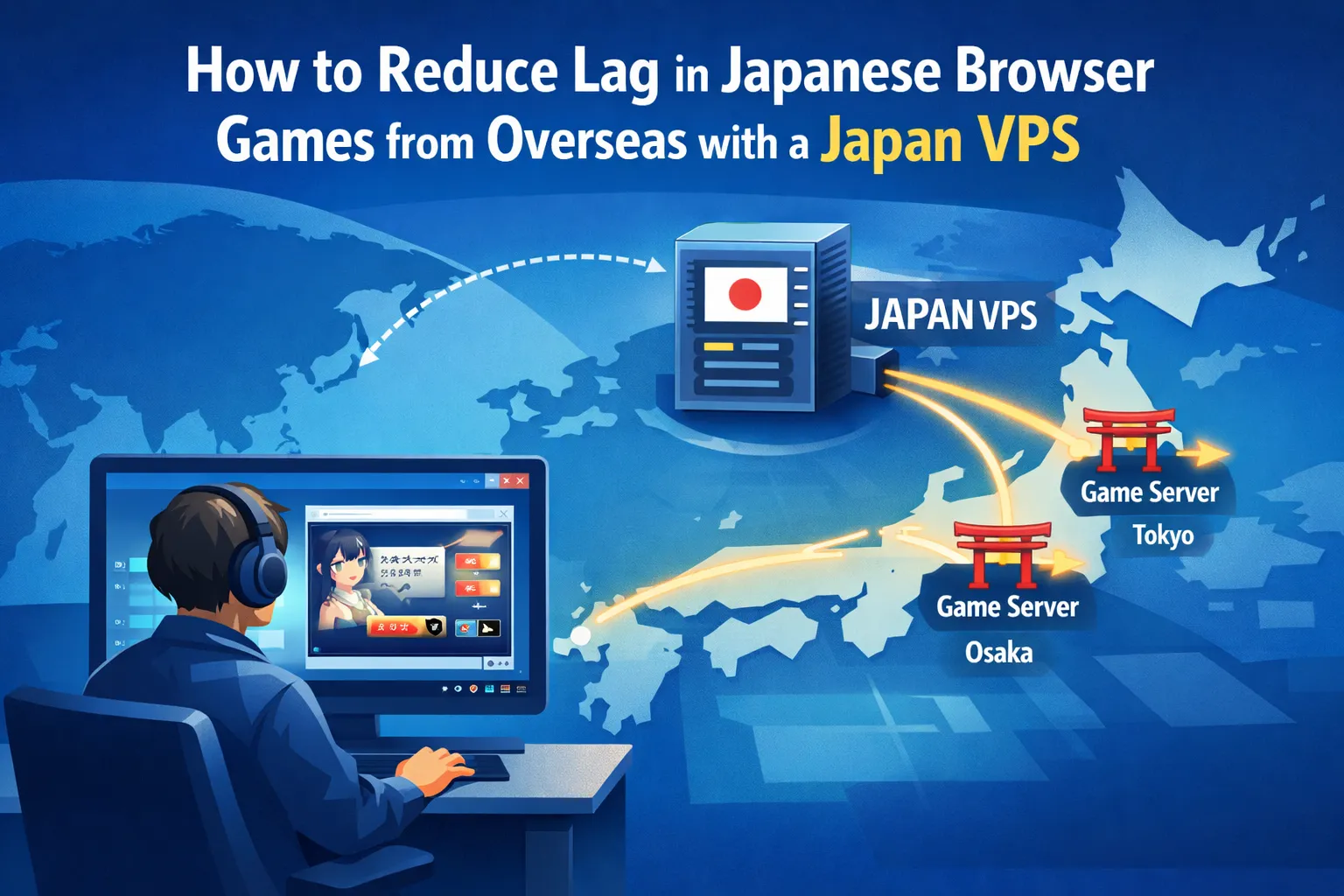
Playing Japanese browser games from overseas often means dealing with higher latency, random disconnects, and slow loading screens. Even if the game itself is turn-based, a sluggish UI or frequent timeouts can quickly ruin the experience. That is where a Japan VPS comes in. By placing your browser inside a Japanese data center and routing your traffic over shorter, more stable network paths, you can feel much closer to the game servers—almost like a local player.
In this article, we walk through how to combine a Japan VPS with simple optimizations on your VPS, your home network, and your browser. You will learn how to choose between Tokyo and Osaka data centers, tune Remote Desktop (RDP) settings for smoother play, keep your VPS environment lightweight, and avoid common bottlenecks on your local connection. We also share browser-level tips for faster loading and more responsive gameplay. If you want to reduce lag and make region-locked Japanese browser titles more enjoyable from overseas, this step-by-step guide will help you get started.
Why Latency Matters Even for Browser Games
Unlike fast-paced FPS games, many Japanese browser games are turn-based or slower in pace. However, latency in browser games still matters for both performance and overall playability:
- High ping makes UI responses feel sluggish.
- Packet loss can cause loading errors and timeouts.
- Unstable routes can disconnect you at critical moments.
Even with slower, turn-based browser titles, players outside Japan will feel a clear difference when latency and routing are optimized.
For players connecting from overseas, a stable connection to Japan is essential for a smooth and enjoyable experience.
Using a Japan VPS to Improve Stability
One effective way to stabilize your connection to Japanese game servers is to route your traffic through a Japan VPS rather than connecting directly from overseas.
A Japan VPS lets you connect to a Windows desktop environment hosted in a Japanese data center. From there, your browser connects to Japanese game servers over shorter, more optimized network routes.
Compared to connecting directly from your home network overseas, this approach:
- Reduces the number of international hops between your browser and the game server, helping to lower latency and packet loss.
- Uses professional-grade connectivity inside Japan, rather than relying only on unpredictable international routes.
- Provides a consistent environment that is easier to optimize and troubleshoot.
For a general overview of this method, see Play Japan-Exclusive Browser Games From Anywhere with a Japan VPS.

Optimizing Your Japan VPS for Lower Ping
To get the most benefit from your Japan VPS, you should also optimize how and where it is hosted. The following tips can help you reduce ping, lower latency, and keep your connection to Japan as stable as possible.
1. Choose the Right Data Center Region
The physical location of your VPS has a direct impact on latency. If you can choose between Osaka and Tokyo, test both options and see which one gives you lower latency from your location. Different ISPs may have better network routes to one city than the other.
For more guidance on choosing a location, see How to Choose VPS Location in Asia.
2. Tune RDP Settings
Your Remote Desktop (RDP) settings also affect how responsive your Japan VPS feels, especially over long distances.
- Lower the display resolution if the connection feels slow or unresponsive.
- Disable the desktop background and unnecessary visual effects to reduce bandwidth usage.
- Turn off audio redirection if you don’t need sound while playing.
3. Keep the VPS Environment Lightweight
A lightweight VPS environment helps your browser and games run more smoothly, without competing for CPU or memory.
- Close unused applications on the VPS while gaming.
- Use a lightweight browser profile with only the extensions you actually need.
- Restart the browser occasionally to clear memory and reset long-running sessions.
Optimizing Your Local Connection
Even with a well-optimized Japan VPS, problems on your home network can still introduce lag and instability. Your local connection to the VPS also affects overall latency and stability. To reduce lag:
- Use a wired connection or a stable Wi-Fi network whenever possible.
- Avoid downloading large files or streaming video on the same network while playing.
- Disable VPNs or proxy services on your local device unless they are absolutely necessary.
By keeping your local network clean and uncongested, you can get the full benefit of your Japan VPS connection.
For more strategies to maintain connectivity during network issues or outages, see How to Stay Online During Cloud Outages.

Browser-Level Tips for Faster Loading
Even small changes at the browser level can improve loading speed and reduce random slowdowns while playing Japanese browser games, especially when you are connecting through a Japan VPS.
- Disable ad blockers and script blockers that may interfere with game scripts or critical resources.
- Periodically clear your browser cache and cookies if pages become slow or unresponsive.
- Try switching between Chrome, Firefox, or other major browsers to see which performs best for your game.
These simple browser tweaks help your Japan VPS setup deliver faster, more reliable gameplay in Japanese browser titles.
Conclusion: Combine a Japan VPS with Good Network Habits

By combining a Japan VPS with basic optimization of your VPS, browser, and local network, you can significantly reduce latency and improve the overall experience of playing Japanese browser games from overseas.
When you are ready to get started, choose a Japan VPS plan that matches your budget, play style, and performance requirements.
For more details on choosing and using a Japan VPS for region-locked titles, read our main guide: Play Japan-Exclusive Browser Games From Anywhere with a Japan VPS.
FAQ
Q1. How does a Japan VPS reduce latency for Japanese browser games?
A1. A Japan VPS places your browser inside a Japanese data center, closer to the game servers. This reduces the number of international hops and uses more stable domestic network routes in Japan. As a result, latency is usually lower and your connection is less affected by congestion or instability on long international paths.
Q2. Do I need advanced technical skills to use a Japan VPS for gaming?
A2. In most cases, you only need to connect to the Japan VPS via Remote Desktop, open a browser on the VPS, and log in to your game as usual. You do not need to manage complex server settings. Basic steps such as logging in, launching the browser, and adjusting simple RDP options are usually enough for most players.
Q3. Which Japan VPS plan should I choose for browser-based games?
A3. Browser games generally require less CPU and RAM than full 3D clients, so a modest VPS plan is often sufficient. Prioritize a stable network connection, enough memory to run your browser smoothly, and a data center region (Tokyo or Osaka) that offers good latency from your location. If you frequently run multiple tabs or other apps, consider a slightly higher-spec plan for better responsiveness.
Find the Right Japan VPS Plan for Your Browser Games
If you want lower latency and a more stable route to Japanese game servers, consider starting with a Japan VPS. By choosing a plan with the right resources and a suitable data center region such as Tokyo or Osaka, you can create a smoother, more consistent environment for playing Japanese browser games from overseas.